Every hard engineering decision I've seen go wrong had the same root cause: the person making the call couldn't see the whole system. Not because they were stupid — because the system was invisible. The context lived in six people's heads, three Confluence pages nobody reads, and a Miro board from 2023 that stopped being updated the week after the offsite.
When context is invisible, every architectural choice is a guess. A confident guess, sometimes, but still a guess. And guesses compound. Two years of confident guesses is how you end up with a system where changing the payment flow requires touching eleven services and a prayer.
This essay is about making context visible — not as a documentation exercise (those always fail), but as a design tool. A way of seeing the system so clearly that the right solution becomes obvious before you write a line of code.
The context problem
Context is everything the code doesn't tell you. It's the business rules that live in a product manager's head. It's the performance constraint that only shows up during the Sunday NFL window. It's the reason the OrderService talks to the UserService through a message queue instead of a direct call — a decision made eighteen months ago by an engineer who's no longer at the company, for a reason nobody documented.
Code tells you what the system does. Context tells you why it does it that way, what it can't do, and what will break if you change it. Without context, you're reading the words but missing the meaning.
The problem isn't that context doesn't exist. It does — it's just distributed across people, time, and artifacts that decay. The half-life of an architecture document is about six months. The half-life of tribal knowledge is one employee departure.
Why documentation doesn't fix this
Every team I've worked with has tried the documentation approach. Write it all down. Confluence pages. ADRs. Architecture diagrams. README files. The pattern is always the same:
- Week 1: enthusiasm. Beautiful diagrams. Comprehensive docs.
- Week 4: the code has drifted from the docs. Nobody notices.
- Month 3: the docs are actively misleading. Worse than no docs.
- Month 6: someone proposes a "documentation sprint" to fix it. The cycle restarts.
Documentation fails because it's a snapshot of a moving system. The moment you finish writing it, it starts decaying. And the cost of keeping it current is exactly the kind of boring, invisible, ongoing work that never survives contact with a sprint board.
What you need instead is a way to see the system that updates as the system changes — or at least, a practice of visualization that's cheap enough to do often and disposable enough that staleness doesn't hurt.
Context maps: the tool I keep coming back to
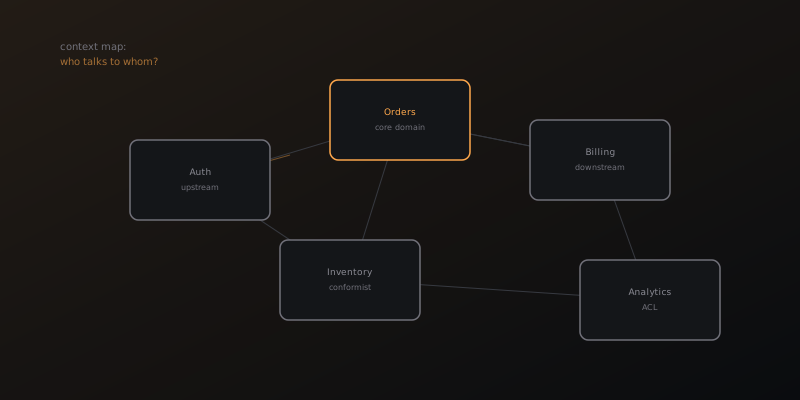
The single most useful visualization technique I've found is the context map from Domain-Driven Design. Not the full DDD methodology — just the map. It takes thirty minutes, a whiteboard, and one question: who talks to whom, and who's in charge?
A context map shows:
- Bounded contexts — the chunks of your system that have their own language, their own models, their own truth. Your billing system's idea of a "user" is not the same as your auth system's idea of a "user." Making that visible prevents an entire class of integration bugs.
- Relationships between contexts — who depends on whom, who conforms to whose API, who translates between models. The arrows matter more than the boxes.
- Power dynamics — which team owns what, which APIs are "upstream" (you adapt to them) vs "downstream" (they adapt to you), where the political boundaries are. This is the part engineers hate thinking about and the part that determines 80% of integration complexity.
I draw a new context map every time I start a project, join a team, or face a decision that touches more than two services. It takes thirty minutes. It's disposable. And it surfaces the invisible constraints that would otherwise ambush me three weeks into the implementation.
The dependency graph you actually need
Most teams have a dependency graph somewhere — an architecture diagram with boxes and arrows. Most of them are useless because they show compile-time dependencies (what imports what) instead of runtime dependencies (what fails when something else fails).
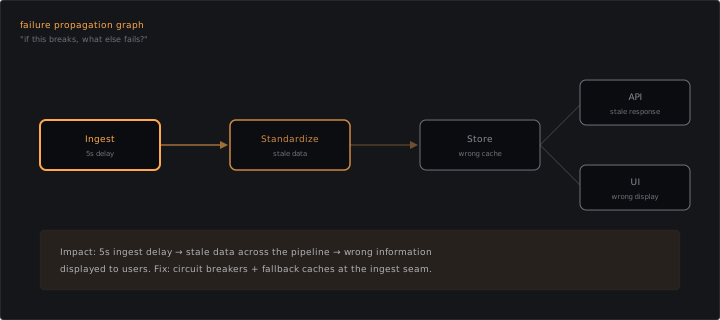
The graph that matters for decision-making is the failure propagation graph. For every service, ask:
- If this service goes down for five minutes, what else breaks?
- If this service returns garbage data for an hour before anyone notices, what downstream decisions are now wrong?
- If this service's latency doubles, which user-facing flows degrade?
Draw that graph and you have a map of your system's actual structure — not the structure you designed, but the structure that emerged. The gaps between the two are where your biggest risks live.
At a previous company, the real-time data pipeline had a dependency graph that looked clean on paper: ingest → standardize → store → serve. But the failure propagation graph revealed that a five-second delay in the ingest layer could cascade into stale data displayed to hundreds of millions of users. The visualization made the risk visible, which made the investment in circuit breakers and fallback caches obvious — not as a "nice to have" but as a "we can see exactly what breaks without this."
Temporal context: the dimension everyone forgets
Most system visualizations are spatial — boxes, arrows, layers. But the hardest context to see is temporal. When does this happen? In what order? What was true last month that isn't true now?
Three temporal visualizations that pay for themselves:
Timeline of decisions. A simple chronological list of every significant architectural choice, who made it, and why. Not a formal ADR — just a bullet list in a shared doc. "March 2024: switched from REST to gRPC for odds ingestion because latency budget was 50ms and REST couldn't hit it. Decision by M.U." When you inherit a system, this is the single most valuable artifact you can find — or create by interviewing the team.
Traffic shape over time. Not averages — shapes. Does your system have a Sunday spike? A month-end batch? A 3am quiet period where background jobs run? Draw the shape and overlay it with your scaling strategy. The mismatches are where your incidents will come from.
Migration state diagram. If you're moving from system A to system B (and you're always moving from system A to system B), draw the current state: what percentage of traffic is on old vs new, what features are duplicated, where the seams are. This prevents the "we're almost done migrating" delusion that turns three-month migrations into eighteen-month migrations.
Making this practical
None of this requires expensive tools. I've drawn useful context maps on napkins, in Excalidraw, on physical whiteboards, and in plain Markdown with ASCII arrows. The medium doesn't matter. What matters is the practice of making the invisible visible before making decisions.
My workflow before any significant architectural choice:
- Draw the context map. 30 minutes. Who are the actors, what are the boundaries, where are the dependencies?
- Draw the failure propagation graph for the area I'm changing. What breaks if my change goes wrong?
- Check the temporal context. What decisions led to the current state? What's mid-migration? What's the traffic shape?
- Only then, propose the solution.
Steps 1–3 take an hour. They save weeks. Not because they give you the answer — but because they let you see the constraints that the answer has to fit inside. The best solution is the one that's obvious once you can see the whole picture. Visualization is how you get the picture.
The real insight
The engineers I respect most are not the ones with the cleverest solutions. They're the ones who see the most context. They know why things are the way they are. They know what's mid-migration, what's load-bearing, what's held together with hope. And they know it because they made it visible — for themselves and for their team.
If your team is making architectural decisions without first drawing the system, you're navigating without a map. You might get where you're going. But you'll take a lot of wrong turns, and you won't know why the last team did what they did until it breaks.
Draw the map. See the system. Then build.